Agents
Ax agents are typed programs that can use tools, child agents, runtime sessions, context policies, memory, skills, discovery, clarification, telemetry, and optimization before returning a final structured response.
auto helper = axllm::agent("question:string -> answer:string");There are two common paths:
- Short agents compose a typed final answer with a small set of tools or child agents.
- Long-horizon agents use RLM runtime sessions, context policy, context maps, memory, skills, and optimizer artifacts to keep multi-step work resumable.
See short agent examples and Advanced Start for the broader Ax path.
The important design choice for long-horizon work is RLM: the model does not merely emit one answer. It writes small runtime steps, Ax executes those steps in a persistent session, and the next turn sees compact evidence plus live runtime state.
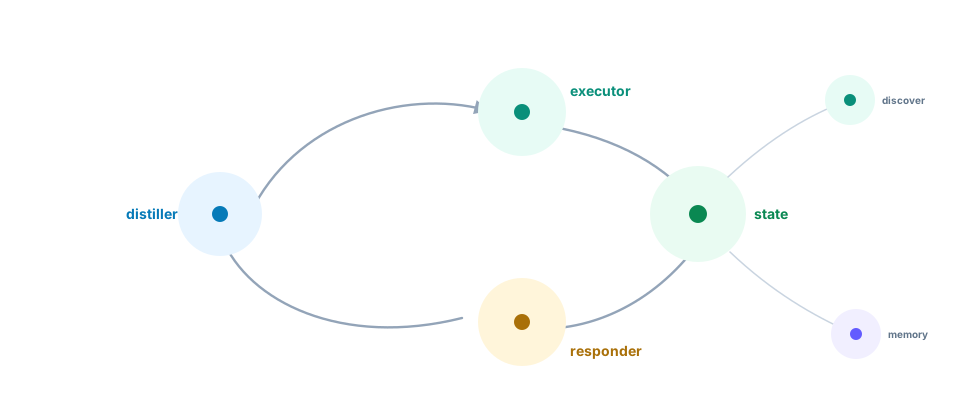
The RLM Pipeline
Each forward() call runs three stages:
flowchart LR
  A[Original typed inputs] --> B[Distiller]
  B -->|executorRequest + distilledContext| C[Executor]
  C -->|tool evidence, runtime state, final envelope| D[Responder]
  D --> E[Typed output]
- Distiller normalizes the task and compresses large context into the exact executor request.
- Executor owns runtime state, tool use, discovery, memory recall, child-agent calls, and final/clarification envelopes.
- Responder turns the executor evidence into the declared output signature.
This is why Ax agents work well with smaller models. A smaller model can take one observable step, inspect a result, reuse live variables, and continue. It does not need to keep an entire long transcript in its immediate prompt.
Short Agents
Use an agent when the model needs to decide what to do next. Use ax() when one structured generation is enough.
auto assistant = axllm::agent(
  "question:string -> answer:string",
  axllm::object({{"contextFields", axllm::array()}})
);
Short agents should stay boring: one signature, a few tools or child agents, and a typed final response. Keep tool sets flat when every callable is obviously relevant.
Long-Horizon Agents
Move to long-horizon agent patterns when the actor must inspect intermediate results, keep executable state alive, recover from tool/runtime failures, or answer many questions over the same large context.
Runtime-As-REPL
An RLM actor turn should be one observable step: inspect, call a tool, log a result, or finish. Successful runtime values stay alive in the session even when older prompt replay is summarized.
sequenceDiagram
  participant M as Model actor
  participant R as Runtime session
  participant L as Action log
  M->>R: const docs = await kb.search(...)
  R->>L: console.log(docs.length)
  L->>M: compact evidence + live variables
  M->>R: await final("write answer", { docs })
Context policy controls what the actor sees again in the prompt. It does not erase runtime state.
auto assistant = axllm::agent(
  "question:string -> answer:string",
  axllm::object({{"contextFields", axllm::array()}})
);
Tools, Namespaces, And Child Agents
Host functions are tools. Child agents are also callables. Both can live in the functions list. Namespaces keep the runtime call surface readable: kb.findPolicy(...), email.sendEmail(...), team.writer(...).
auto assistant = axllm::agent(
  "question:string -> answer:string",
  axllm::object({{"contextFields", axllm::array()}})
);
Use child agents when a specialist should have its own signature, tools, runtime, or identity. Pass parent fields explicitly or use input update callbacks when many child calls need shared values.
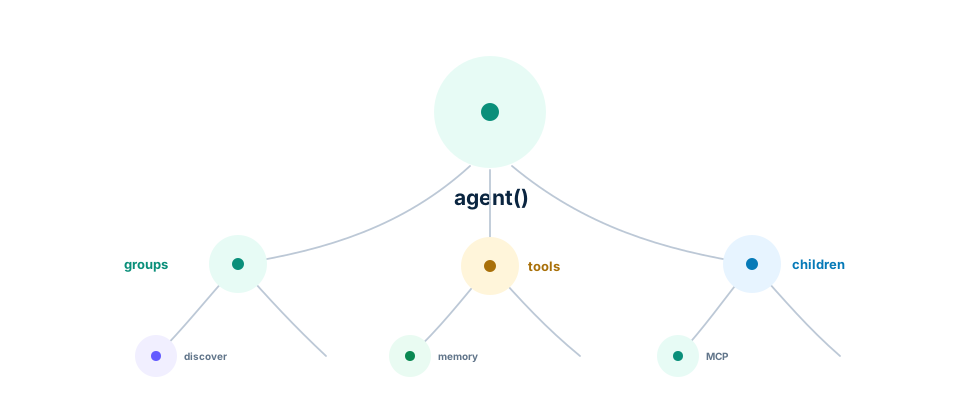
Function Discovery
Small tool sets can be passed flat: functions: [findPolicy, writer, mcpClient]. That is best when every callable is obvious enough to keep in the actor prompt.
Large tool sets should be grouped into modules. A group has namespace, title, optional description, optional selectionCriteria, optional alwaysInclude, and functions. The actor sees module summaries first, then calls discover(...) to load concrete function definitions only when it needs them.
auto assistant = axllm::agent(
  "question:string -> answer:string",
  axllm::object({{"contextFields", axllm::array()}})
);
flowchart LR
A[Module summaries] --> B{Actor needs details?}
B -->|yes| C[discover module]
C --> D[Function schemas enter prompt]
D --> E[Call namespaced tool]
B -->|no| F[Answer or inspect]That is the trick behind very large Ax agent tool catalogs: the prompt carries the map, not every tool schema. The model can choose a namespace from concise selection criteria, load only that module, call the concrete tool, and keep evidence in the runtime session. This is especially useful for smaller models because they do not have to rank hundreds of function definitions in one prompt.
Keep the top-level functions shape either flat or grouped. Mixed plain functions and groups are rejected. In grouped mode, put fn() tools, MCP providers, and runtime providers inside groups; expose child agents with childAgent.getFunction().
Clarification And Resume
Agents can ask for clarification instead of guessing. In public forward() and streamingForward() flows, clarification throws a structured clarification error. The host saves state, asks the user, restores the state, and resumes.
Use clarification when missing information changes the action, side effect, recipient, policy, or output contract. Do not burn context guessing.
Context Management
Long-running agents need a context policy:
| Preset | When to use |
|---|---|
full | Short tasks, debugging, weaker models that need exact replay |
checkpointed | General default for real multi-turn agent work |
adaptive | Summarize older successful work sooner |
lean | Very long runs with strong models and tight prompt pressure |
Context maps are different: they are persistent orientation caches for repeated runs over the same long context, repository, document set, or system. Use them when many tasks ask different questions over the same material.
For how the stages, context maps, trajectory compaction, and offline optimizers fit together — and the papers behind them — see Agent Internals.
For concrete code, see Advanced Start and the generated examples.
Memory And Skills
Memory and skill search let the actor load only what it needs.
auto assistant = axllm::agent(
  "question:string -> answer:string",
  axllm::object({{"contextFields", axllm::array()}})
);
flowchart TB A[Agent task] --> B[recall searches] B --> C[Memory store] C --> D[inputs.memories next turn] A --> E[discover skills] E --> F[Skill store] F --> G[Loaded Skills prompt section] D --> H[Executor] G --> H
Memories are task-relevant facts from an external store. Skills are procedural guides, runbooks, or domain conventions. Loaded/used callbacks let the host trace what the agent loaded and what it claims it relied on.
MCP And External Tools
MCP clients and other tool providers can be exposed as functions, either directly or inside grouped discovery modules. Put them under clear namespaces and selection criteria so the actor can choose them without seeing every schema on every turn.
Observability
Trace actor turns, tool calls, discovery, memory recall, skill loads, child-agent calls, clarification, context pressure, token usage, costs, and final typed outputs. Agent behavior is production workflow behavior; it should be observable like one.
Optimizing Agents
Agent optimization should use realistic task records. Tune tool use, clarification behavior, child-agent delegation, and final response quality against examples that expose those tradeoffs.
auto assistant = axllm::agent(
  "question:string -> answer:string",
  axllm::object({{"contextFields", axllm::array()}})
);
Use agent.optimize(...) for normal agent tuning. Use top-level optimize(...) for plain ax() programs and flows.
See Tools, agent() agents, and agent() API.