agent() Agents
Use agent() to build either a short tool-using agent or a long-horizon RLM agent with a typed final response.
from axllm import agent

helper = agent('question:string -> answer:string')
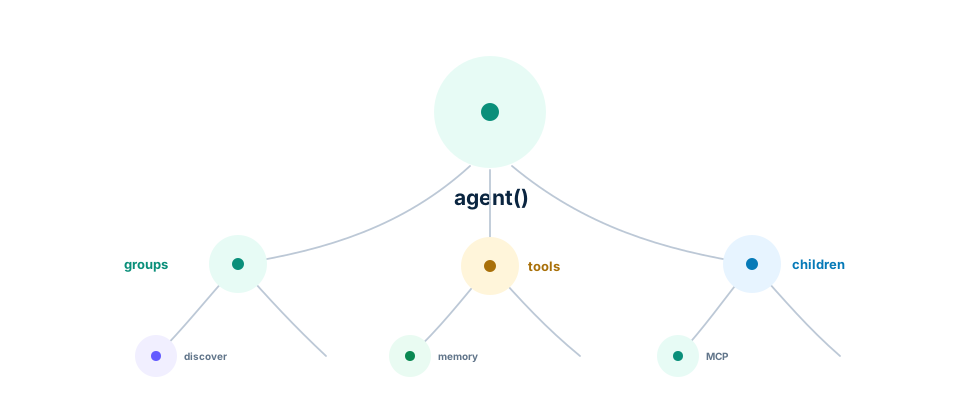
Agents coordinate tools, child agents, runtime sessions, memories, skills, context policies, discovery, recall, shared fields, traces, usage, and final typed responses.
Pick the path by task shape:
- Short agents: quick tool calls, small child-agent composition, and compact final responses.
- Long-horizon agents: RLM runtime execution, context policy, context maps, memory, skills, and optimizer artifacts.
See short agent examples and Advanced Start for the broader Ax path.
What It Does
agent() creates a structured agent program. The agent planner/executor/responder loop can call tools, delegate to child agents, inspect runtime state, ask for clarification, discover tools or skills, recall memory, and finish with a typed output object.
Actor code stages request one exact javascriptCode field. Native-capable providers use strict json_schema; providers without native schema support use validated json_object, so DeepSeek Agent execution does not depend on provider-visible tools. Generated-language distiller and executor stages make one validation correction attempt by default through validation_retries; an explicit zero disables the retry.
Core Call Shape
helper = agent(signature, options)
result = helper.forward(aiClient, inputs)
Common Patterns
- Start with a signature that names the final answer fields.
- Add
fn()tools for host data and side effects. - Add child agents to the same callable list as tools.
- Use namespaces to keep tool calls readable.
- Enable discovery when available tools are too numerous to include in full.
- Save and restore state around clarification.
- Use context policies for long-running sessions.
Short agent
from axllm import agent

assistant = agent("question:string -> answer:string", {"contextFields": []})
out = assistant.forward(client, {"question": "Capital of France?"})
Stream the answer
streamingForward() runs the distiller and the executor first, then streams the responder’s answer as field deltas. A clarification or an executor error surfaces before any delta. Each delta carries a version: merge the deltas of one version (strings append, other values replace) and start over when the version changes. The citation check runs when the answer completes; an answer that cites evidence the run never gathered is sent back for a correction, which streams as a new version, and onCitations fires after the stream ends.
# The handbook stays in the agent's runtime, out of the prompt. With citations
# on, the answer cites the evidence it used, and ids the run never gathered are
# sent back to the model for a correction.
assistant = agent(
    "question:string, handbook:string -> answer:string",
    {
        "contextFields": ["handbook"],
        "runtime": {"language": "JavaScript"},
        "citations": {"onCitations": lambda ids: print(f"\ncited: {ids}")},
    },
)

# The distiller and the executor run first; then the responder's answer streams.
# Merge each delta and start over when the version changes (a retry).
merged, version = {}, 0
for delta in assistant.streaming_forward(
    client,
    {
        "question": "I downgraded today. When does it take effect, and is my data safe if I delete the workspace?",
        "handbook": handbook,
    },
    {"runtime": AxQuickJsCodeRuntime(), "max_actor_steps": 12},
):
    if delta["version"] != version:
        merged, version = {}, delta["version"]
        print("\n[retry: starting over]")
    for field, value in delta["delta"].items():
        merged[field] = merged.get(field, "") + value if isinstance(value, str) else value
        if field == "answer":
            print(value, end="", flush=True)
print()
Namespaced tools and discovery
Use a flat functions list for small stable sets: local fn() tools, child agents, MCP clients, and runtime providers can all live beside each other. The actor sees those callables directly.
assistant = agent('message:string -> reply:string', {
    'functions': [search],
    'contextFields': [],
})
Use grouped functions when the catalog is large or easier to reason about by domain. Each group gives the actor a namespace plus module-level selection criteria; with functionDiscovery: true, concrete schemas are loaded only after the actor calls discover(...). You rarely need to set the flag yourself: autoUpgrade (ON by default) enables discovery automatically once the inline tool docs get large, and likewise keeps oversized input values runtime-only with a truncated prompt preview when they aren’t declared in contextFields. Explicit settings always win; pass autoUpgrade: false to opt out.
from axllm import agent

assistant = agent("question:string -> answer:string", {"contextFields": []})
out = assistant.forward(client, {"question": "Capital of France?"})
For the cross-language smart-default path, see the Smart Defaults Agent in the long-agent examples.
Grouped mode keeps big catalogs out of the prompt until needed. Keep the top-level list either flat or grouped. If a child agent belongs inside a group, pass childAgent.getFunction() inside the group’s functions list.
Memory, skills, and context policy
from axllm import agent

assistant = agent("question:string -> answer:string", {"contextFields": []})
out = assistant.forward(client, {"question": "Capital of France?"})from axllm import agent
assistant = agent("question:string -> answer:string", {"contextFields": []})
out = assistant.forward(client, {"question": "Capital of France?"})Connect MCP servers
MCP clients can be passed as tool providers after initialization. Use the flat form when the server exposes a small, obvious tool set.
client = AxMCPClient(transport)
client.init()
assistant = agent("request:string -> response:string", {
    "functions": client.to_function(),
    "functionDiscovery": True,
    "contextFields": [],
})
Use grouped discovery when an MCP server has many tools, prompts, or resources. The group gives the actor a namespace and selection criteria before it asks to see detailed schemas.
assistant = agent("request:string -> response:string", {
    "functions": [{
        "namespace": "memory",
        "title": "Memory MCP",
        "selectionCriteria": "Use for persistent memory lookup.",
        "functions": client.to_function(),
    }],
    "functionDiscovery": True,
    "contextFields": [],
})
Production Notes
Trace actor turns, tool calls, child-agent calls, clarification, discovery, recall, context growth, token usage, and final typed outputs. Keep host functions narrow and typed. Let fatal infrastructure errors bubble; let task uncertainty become clarification or a typed final answer.
See Tools, agent() API, and MCP.