Standard Agents
The workhorse tier: real workflows with namespaced tools, specialist child agents, structured outputs, and clarification when the request is ambiguous. Same harness as micro, more of it switched on.
Tools, Namespaces, And Child Agents
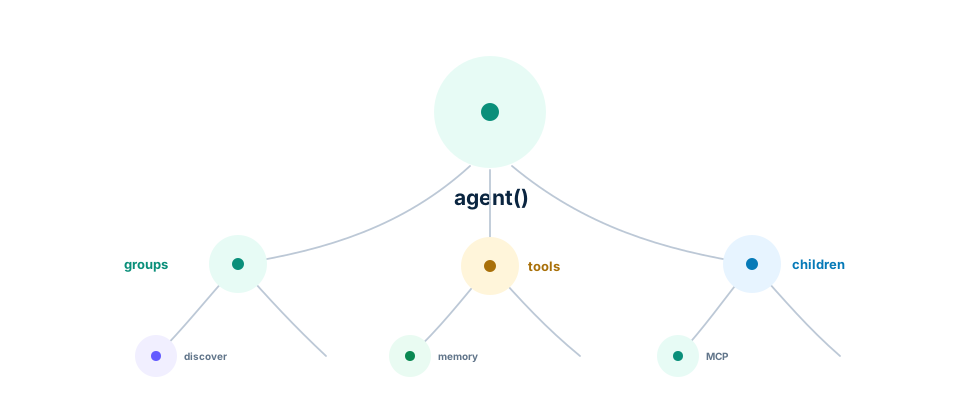
Host functions are tools. Child agents are also callables. Both live in the functions list, and namespaces keep the call surface readable: kb.findPolicy(...), email.sendEmail(...), team.writer(...).
let mut assistant = axllm::agent("message:string -> reply:string")?;
assistant.program.tools.push(search);
Use a child agent when a specialist should have its own signature, tools, runtime, or identity. Pass parent fields explicitly, or use input update callbacks when many child calls need shared values.
Scaling The Tool Catalog
Small tool sets should stay flat — functions: [findPolicy, writer, mcpClient] — with every schema in the actor prompt. Flat inline tools are also the most reliable shape: the actor sees exact parameter names on every turn, which matters most on smaller models.
When the catalog grows past what belongs in one prompt, group tools into modules. A group has namespace, title, optional description, optional selectionCriteria, optional alwaysInclude, and functions. The actor sees module summaries first and calls discover(...) to load concrete schemas only when a module is actually needed.
use axllm::agent;

let mut assistant = agent("question:string -> answer:string")?;
flowchart LR
A[Module summaries] --> B{Actor needs details?}
B -->|yes| C[discover module]
C --> D[Function schemas enter prompt]
D --> E[Call namespaced tool]
B -->|no| F[Answer or inspect]That is the trick behind very large Ax tool catalogs: the prompt carries the map, not every schema. This especially helps smaller models, which should not have to rank hundreds of function definitions in one prompt. An advisory relevance ranker flags the modules, skills, and memories most likely to matter for the current task, so the actor discovers the right module first. You usually don’t set functionDiscovery yourself: autoUpgrade (ON by default) turns it on automatically once the inline tool docs get large. Set it explicitly to force the behavior either way.
The default ranker and smart-upgrade behavior are shared by the generated language packages as well as TypeScript; the Smart Defaults Agent in the long-agent examples is the copyable cross-language form.
Keep the top-level functions shape either flat or grouped — mixed plain functions and groups are rejected. In grouped mode, put fn() tools, MCP providers, and runtime providers inside groups; expose child agents with childAgent.getFunction(). MCP servers plug in as ordinary tools — see MCP.
Clarification And Resume
Agents ask instead of guessing. When required information is genuinely missing, forward() and streamingForward() throw a structured clarification error; the host saves state, asks the user, restores, and resumes. Use clarification when the missing fact changes the action, side effect, recipient, policy, or output contract.
Chain-Of-Evidence Citations
Answers can be required to point at the evidence that grounds them. With citations: true, the responder gains an optional evidenceCitations output listing the evidence ids the answer relies on — the keys of the evidence object the actor curated, plus the ids of loaded memories. Citations are validated against the ids that actually exist; an invalid citation re-prompts the responder through the standard validation-retry loop, and runs without evidence skip validation entirely. Use citations: { surface: 'hidden', onCitations } to keep the result shape pristine and read citations from the callback.
Be precise about the guarantee: validation proves every citation points at evidence that exists — the model cannot claim support from a source it never collected. It does not verify that the answer’s claims match the cited evidence’s content; that judgment stays with you (or a judge you add). Citation granularity follows how the actor curates evidence: one big notes blob yields one coarse citation, while separate keys per fact yield precise ones. TypeScript and all five generated language packages share this validation behavior; observer callback spelling follows each language’s API.
Lineage: Self-RAG (citation-aware generation) and Attributed QA (attribution as a measurable property) — see the Research Map.
The Knobs That Matter Here
| Option | What it does |
|---|---|
functions | Flat tools/child agents, or grouped discovery modules |
functionDiscovery | Module summaries + on-demand discover(...) for big catalogs (auto-enabled by autoUpgrade for large catalogs) |
autoUpgrade | Smart defaults, ON: auto-enable discovery for big catalogs, keep oversized inputs runtime-only |
citations | Opt-in: answers must cite the evidence ids they rely on, validated in-pipeline |
agentIdentity | Name, description, and namespace when this agent is someone’s child |
maxTurns | Upper bound on actor turns per forward |
When To Graduate
Bulky input fields, long runs, repeated questions over the same material, or cross-run memory all point at the long-horizon tier — context fields, context policies, maps, memory, and skills.
Runnable code: agent examples, Tools, and the agent() API.
Attached MCP clients stay available to an agent’s own stages. Child inheritance selects which clients cross the delegation boundary; none and an empty allowlist pass no parent clients. A child’s explicitly configured clients take precedence. Run cancellation reaches pending MCP tools in delegated children, and closed parent callbacks reject later invocations.
Imported MCP tools retain the run’s cancellation context. Built-in HTTP requests close when cancelled. A custom transport can implement the optional context-aware send method; an older transport may finish later, and its late result is discarded. Cancellation does not undo an external action.